One truly exciting part of being a librarian at the UC Berkeley Library is the opportunity to do our own research. I came to Berkeley from a background as a public health epidemiologist (very quantitative!) but was supported as I learned qualitative methods and was part of research projects that involved interviewing and analyzing qualitative data. However, the most exciting project I’ve been part of at Berkeley is the one in which I was able to learn from the amazing UC Berkeley Library’s Oral History Center about how to be an oral historian, and I interviewed 15 long-term Berkeley librarians (one with more than 40 years of service!) about how they navigated change over their time here. The project is called Librarians Navigating Change, and the transcripts are live! For more about the project, this wonderful article has the details.
An unexpected and totally fascinating aspect of this project was learning more about the history of the libraries at Berkeley. I learned quite a bit, of course, from the project’s narrators, but I also got to dig into documents and sites with information about the earlier buildings, collections, and people of the libraries. Consider, for example, Joseph Rowell, who was UC Berkeley’s first full-time librarian, a position he held for almost 45 years (he’s in the California Library Hall of Fame!). Consider also the magnificent Bacon Hall (originally called the Becon Art and Library Building), built in 1881 during Rowell’s tenure, the first campus building specifically allocated for use as a library. There was a UC Berkeley library as early as the date that classes began in 1869, but it was small, and it perched in various buildings before finding a more permanent home 12 years later. To me, Bacon Hall seems quite monumental in scale and design, even if not as elegant as Doe Library, which was completed in 1911.
Source: “Bacon Library, 1901”, retrieved from Calisphere
So, imagine my delight when project narrator and long-time Berkeley librarian Corliss Lee mentioned that she still had the notebook of handouts she had collated in 1991, her first year as a librarian at Berkeley, working in the Moffitt Undergraduate Library. While I’m older myself, I didn’t graduate from library school until 2008, so this 35-year-old notebook was a treasure trove, a time capsule, and whatever other collection of historical coolness you want to call it. I was able to scan 172 pages of it for inclusion on the “Librarians Navigating Change” project site, and at least for geeks of the history of libraries and the history of information technologies, they make fascinating reading! Here are a few highlights…
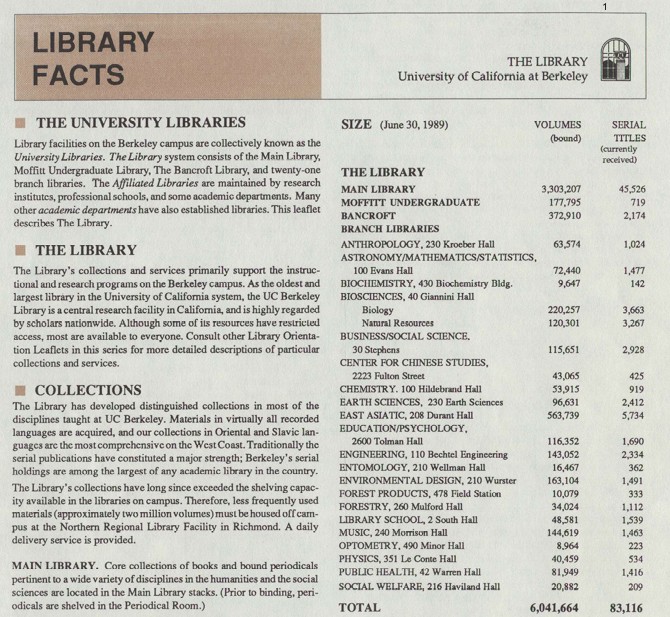
1) Library Facts, 1989: Interestingly, there were already 2 million volumes stored off site, even then! And, I may have to try to hunt down pictures of the Entomology Library.
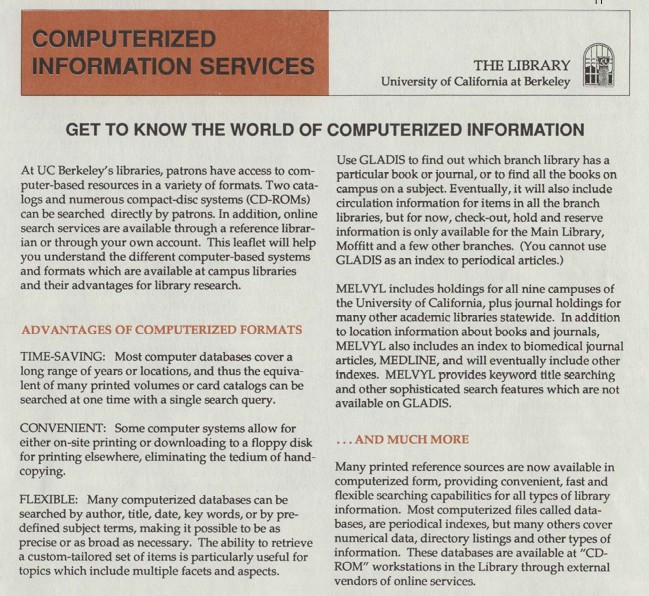
2) Computerized Information:
For those of us who are a certain age, CD-ROMs and floppy disks were once a fact of life—but this handout makes us realize how very revolutionary they were compared to looking at multiple volumes of books, and hand-copying.
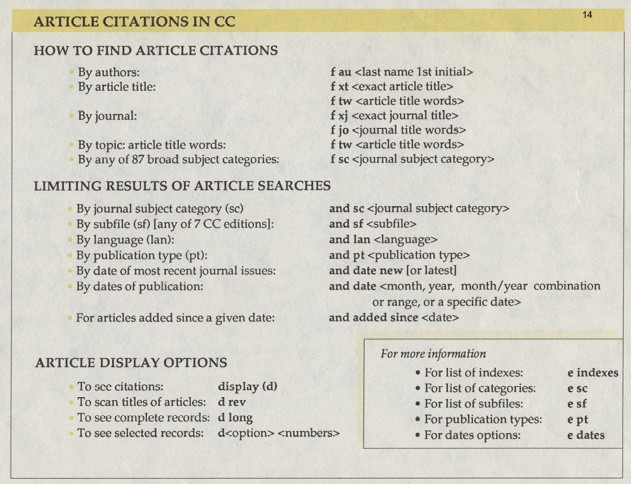
3) Finding Article Citations:
Finding articles using keywords has come a LONG way. As librarians, we know that these types of commands may be called on behind the scenes of what the user sees, but even these are dying out as search algorithms become more sophisticated. Today’s user doesn’t need to know any of these for a simple database citation search! (But they may still help you with an advanced search—ask us librarians if you ‘d like to see how, we love this stuff.)
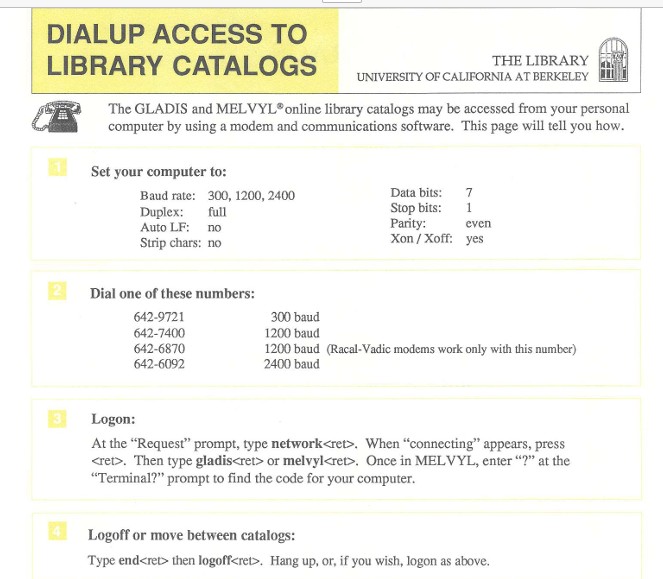
4) DialUp Access
First of all, note that there was MORE THAN ONE CATALOG. As Corliss Lee mentioned in her interview for the project, “At some point we had Telnet GLADIS [and] Telnet MELVYL. I think [the web versions were called] Pathfinder and Web MELVYL… we couldn’t even agree how many catalogs we had! Did we have two catalogs each with two interfaces? Did we have three catalogs because the MELVYL’s [two platforms] were more alike than GLADIS and Pathfinder were? Or do we have four catalogs? And I think that’s a bad sign. Your staff can’t figure out how many catalogs you have. But those were the days, man.”
Secondly, even I can’t remember what a baud is, and that’s fine with me, but I do remember that to dial into the service, you had to use a long cord to connect a phone that looked like the one in the picture on the upper left, to a specialized outlet, or jack, in your wall. Like ethernet is now, but WAY WAY WAY slower.
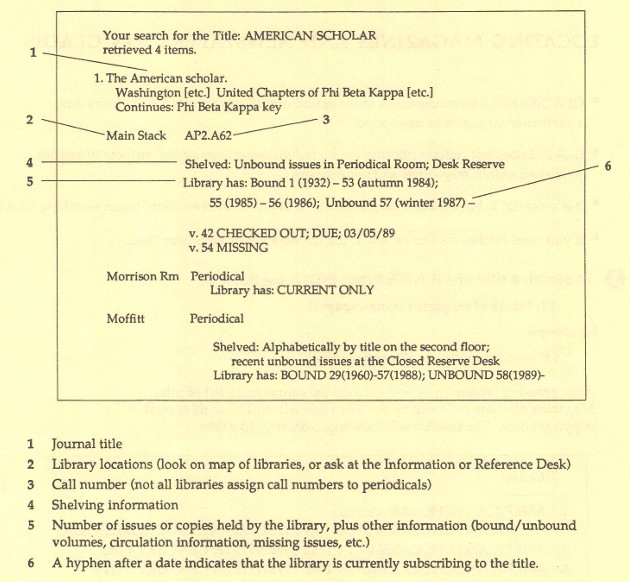
5) GLADIS Journal Search Result
The thing that strikes me about this diagram is how similar it is to the record you might look at today! All of the essential categories and organizational guiding numbers and characters are still how we make sure our items are findable! If you go to lib.berkeley.edu and do a journal search (by using the drop down menu to the right of the search box), you’ll find this record, and scrolling through, you’ll see it has similar information, similarly arranged! The difference is that now we have online access, we aren’t tracking the locations of print volumes of the journal anymore. Which is OK overall.
6) Moffitt Library Newsletter (back in the day!)
While we aren’t disseminating news in paper format anymore (for the most part), the message of welcome and support for undergraduate students remains the same.

7) Asian American Oral Histories
The UC Berkeley Library’s Oral History Center (formerly known as the Regional Oral History Office ) has collected a large and robust range of oral histories, many of which are now available online. The important part here, in my opinion, is to note that oral histories can serve as “a starting point for research on a variety of subjects.” And now that they are available online and therefore are searchable, it’s much easier to explore!

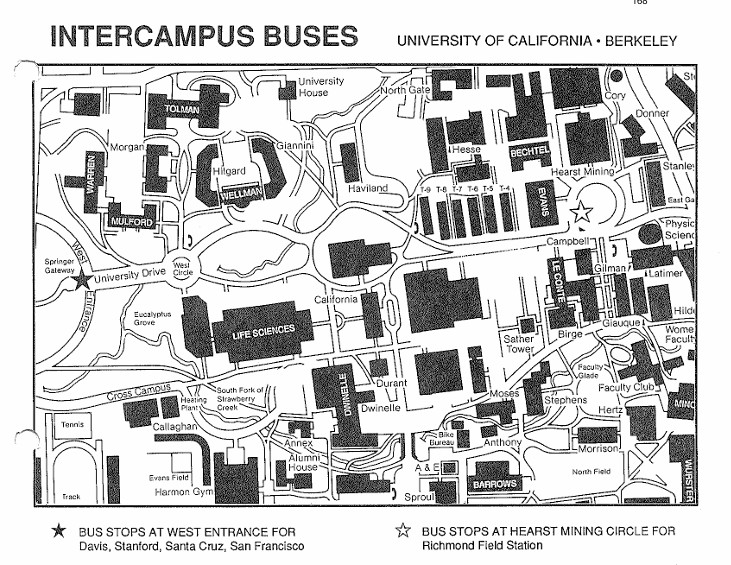
8) Campus Map
I love looking at old maps, and this one is no exception. There are so many buildings that have gone up since the early ‘90s! Most notable to me is the C.V. Starr East Asian Library, the one you can now see from Memorial Glade, with the façade that I think looks like stained glass. Also, note that at this time, the Main Stacks which run underneath Memorial Glade, hadn’t even been built yet (the rectangles labeled T-4 through T-9 were temporary buildings built during World War II). And you could take buses from campus to Davis, Stanford, Santa Cruz and SF.
I hope you’ve enjoyed this trip down (institutional) memory lane! Next up for this project—a presentation at the annual Oral History Association Conference in October, in Portland, Oregon, titled “ ‘Adventures You Can’t Even Begin to Imagine’: The Librarians Navigating Change Oral History Project”. Onward!



